data analysis made easy
Muscle-BIDS step by step
This page is a short overview of how to run the Muscle-BIDS pipeline. The full Muscle-BIDS manual describes every step, all config options and troubleshooting, and includes a complete run, step by step.
The pipeline has seven steps in three groups: BIDS conversion (steps 1 and 2), data processing (steps 3 to 6) and analysis (step 7).
The challenge behind automated processing is actually understanding the data and knowing how to handle it. Here there are many choices and not all can be derived from the data itself. The approach in QMRITools to handle this is by specifying these choices in a config.json file, see the config file chapter of the manual. Example config files for different studies are listed under manuals and scripts.
Starting a project
To start processing, the raw dicom data should be placed in the source data folder 01_sourcedata where each subject and session is its own folder. The folder name is comprised of the subject name and the session name, without hyphens, underscores, periods or spaces in the names themselves. If no session is given, session 001 is used.
Subject001
Subject002_001
Subject002_002
etc..
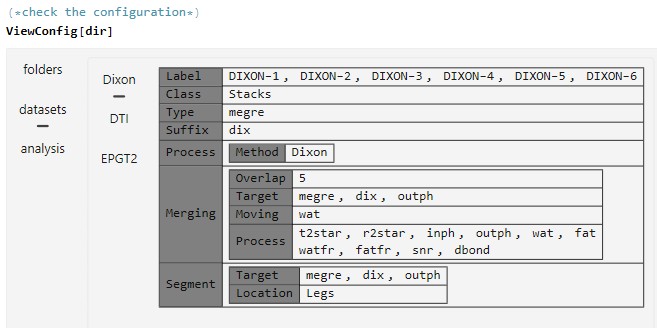
The configuration file config.json is placed in the study folder dir which is given to the software as input. A configured config.json file can be checked and evaluated by the commands
ViewConfig[dir]
CheckConfigLabels[dir]
If a subset of data needs to be processed this can be selected with
SelectSubjects[dir]
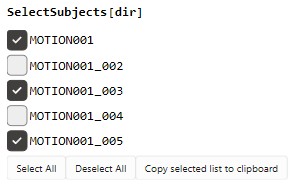
The selected list can be used as value of the option ProcessSubjects in all steps below (subs in the examples), where All processes all subjects.
Step 1 and 2. Bids conversion
(* 1. convert the dcm to nii, skips the folders already done *)
BidsDcmToNii[dir, ProcessSubjects -> subs]

(* check the protocol names of the scans against the labels in the config *)
ViewProtocolNames[dir, ProcessSubjects -> subs]

(* 2. convert the raw nii to bids nii, deletes raw files after conversion *)
MuscleBidsConvert[dir, ProcessSubjects -> subs]
Step 3 to 6. Data processing
(* 3. process all bids files that are found, processing is defined in the config *)
MuscleBidsProcess[dir, ProcessSubjects -> subs, VersionCheck -> False]

(* 4. merge multiple stacks of the same data into one dataset *)
MuscleBidsMerge[dir, ProcessSubjects -> subs, VersionCheck -> False]

(* 5. perform the segmentation using CNN *)
MuscleBidsSegment[dir, ProcessSubjects -> subs, VersionCheck -> False]

(* 6. perform tractography, generates tracts *)
MuscleBidsTractography[dir, ProcessSubjects -> subs, VersionCheck -> False]
Steps 3 to 6 skip data that is already processed. With VersionCheck -> True data processed with an older version of QMRITools is also redone.
Step 7. Analysis of output
(* 7. perform data analysis, generates xlsx and images *)
MuscleBidsAnalysis[dir, ProcessSubjects -> subs]
The results are stored per subject and session in 05_analysis, and all subjects are combined in one Excel file.